Local Kiklet: how I put together an almost free voice routine on macOS
In short, this is an attempt to bring voice input to a state where you want to use it every day, and not “sometimes for fun.”
Can't open a separate application.
Don't press ten buttons.
Do not copy the result manually.
Do not pay for this as for another full-fledged subscription.
I wanted to get the most everyday scenario possible: I held down a key, dictated a thought, released the key, and received normal text directly in the current input field.
Technically, this story is not completely free, but in real life the cost is so low that the bill comes down to tenths of a cent per week.
🧪 Why did I even take up this utility?
The goal was not to “make another voice recorder.”
The goal was to remove two equally annoying things from everyday work:
- voice messages;
- hand printing where a thought has long been faster to say than to type.
I needed a very specific script:
- I am already in the desired window.
- Press and hold the hotkey.
- I dictate.
- I receive the finished text in the same place where the focus was already placed.
And here was the key principle for me: the instrument should not introduce a new ritual.
If for the sake of dictation you need:
- open a separate window;
- look at the huge recording interface;
- then confirm processing;
- then go back;
then this is no longer acceleration, but a new layer of friction.
This is exactly why I initially designed this thing as a quiet service layer on top of regular work, and not as the “main application of the day.”
🎯 What was a priority from day one
At the start, the project had a very mundane KPI: cost.
I didn’t want to make a tool that solves an understandable everyday problem, but at the same time turns into another noticeable monthly expense.
Therefore, the architectural solution was quite straightforward from the very beginning:
- The main circuit must operate locally.
- The cloud should be connected only where it really provides added value.
- This should be installed as a normal
app, and not as a set of scripts for adventure lovers.
I consider this stage closed.
And here the project took an important turn: now the main issue for me is no longer cost, but accuracy.
For the money everything worked out very well. I'm still not satisfied with the quality of recognition. I will return to this separately below, because this is where the main development is currently taking place.
👥 Who did I do this for?
A separate important point: I did not make this thing as a tool only for those who like to live in configs and manual assembly.
I needed a tool for the average macOS user who doesn’t want to tinker with the config every evening and put something together piece by piece.
The ideal scenario for me here looks as mundane as possible:
- Download
app. - Issue permits.
- Add a key for cloud actions.
- Put the conditional ten dollars there.
- Then just use it and don’t think about it every day.
At the same time, I did not deliberately close the project in a “black box”.
If you just want to install and use, this should work.
If you want to open the sources, rewrite part of the logic, replace prompts, or turn off post-processing altogether, this should also be possible.
🧱 Architecture of the current version
If you decompose Local Kiklet into layers, the picture now looks like this:
It was important for me that each of these layers should live separately and not bear someone else’s responsibility. This is what keeps the system practical and not magical.
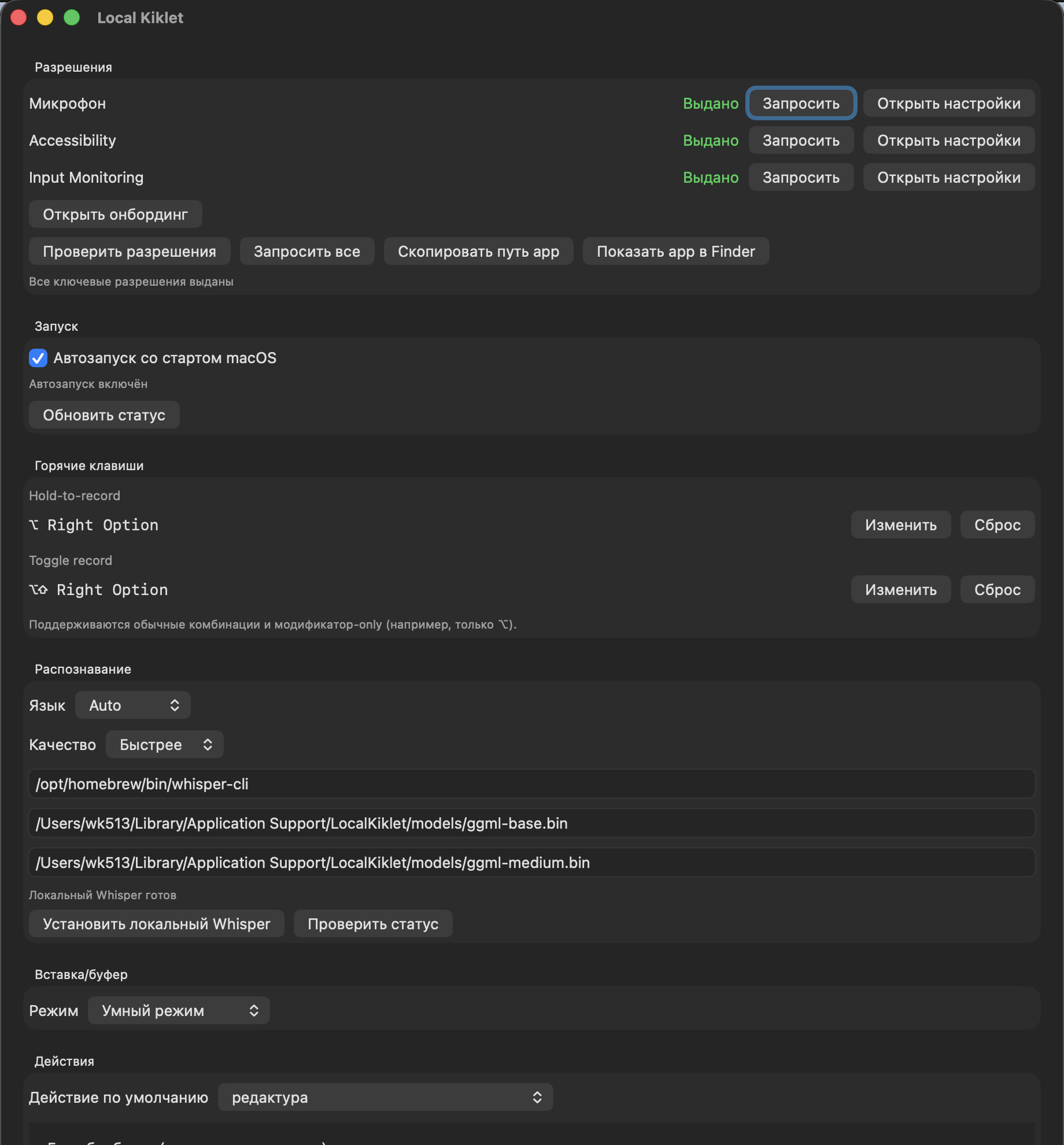
1) Launch and permissions layer
The most boring part of a product is often the most critical.
If an application on macOS cannot clearly bring a person to a working state, everything else is no longer very important. You can talk as much as you like about convenience, but if the user is stuck on access rights, the story is over.
Therefore, I deliberately did not leave permission “for later.”
In the current version, the application monitors and checks three things:
- access to the microphone;
- availability of text insertion into other applications;
- global hotkeys, including modifier-only mode.
Moreover, it was important for me not just to show the status, but to package a normal service UX around it:
- request permission directly from the interface;
- open system settings;
- recheck the status;
- show the path to the installed
app; - give a button that will show the installed package in the file manager.
This seems like a small thing only until the first real use. In practice, it is these little things that separate a working tool from a prototype.
2) Control layer: hotkeys
Here I had another very specific requirement: the key should feel natural.
In my main scenario, the entry sits on the right ⌥.
Separately, there is also a toggle mode, when recording starts by pressing and stops by pressing again.
But what is truly important is not the combination itself, but the fact that the hotkey works globally and does not require the user to enter a separate mode.
And I’ll separately note something that I deliberately did not throw out as a “rare case”: support for hotkeys only on modifiers.
On paper this looks like a minor feature. In real life, this is the difference between “well, yes, you can configure it” and “yes, you really want to use this every day.”
3) Recognition layer
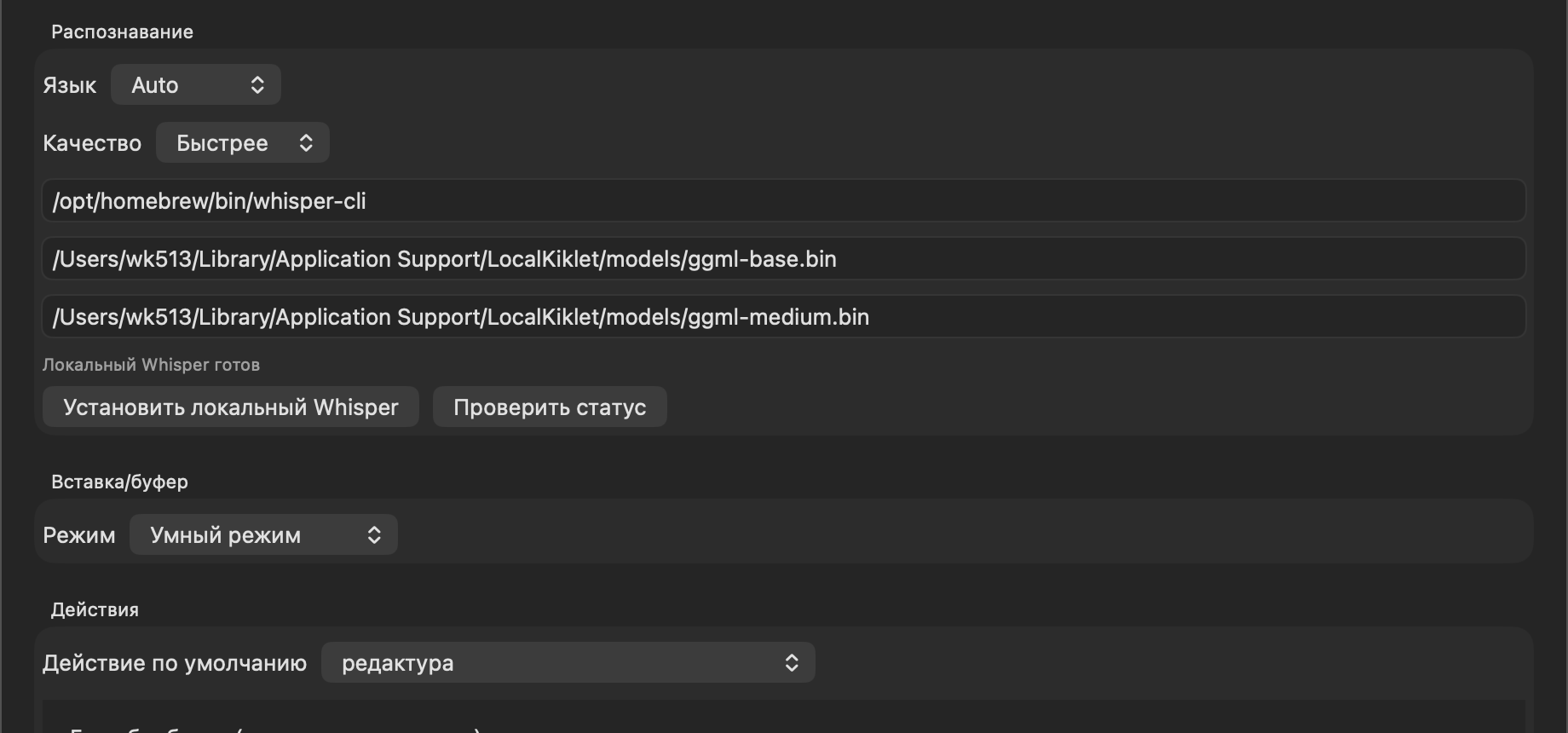
The main recognition circuit operates locally.
In its current form there is:
- auto-language detection;
- manual language selection;
- two quality profiles: faster and more accurate;
- separate paths to the binary and two local models;
- checking the engine status directly from the settings.
It was important for me not to hide this layer completely under the hood.
If your local engine hasn’t started up, the model hasn’t downloaded, or the path has gone away, then the beautiful interface on top won’t save anything. Therefore, in the settings this level is left transparent: you can see the current state and correct it manually.
4) Result delivery layer
This is where the part for which the whole story was made begins.
It wasn't enough for me to just receive the text.
I needed the text to end up where I was already working.
Therefore, the current delivery layer is structured like this:
- if there is an active input and insertion is possible, the text is inserted there;
- if the insertion does not work, the result goes into the buffer;
- at the top there is a short feedback about what exactly happened.
In the settings this is presented as three modes:
- smart mode;
- always insert;
- always in the buffer.
It is the smart mode that is my main one. It gives the same feeling that the utility does not live separately from the rest of the system, but is neatly integrated into it.
5) Text action layer
This is perhaps the most interesting layer of the entire structure.
Because raw transcription in itself is useful, but it is the actions on the text that turn it from “okay” into a normal everyday tool.
There are predefined actions inside:
- translation;
- more formal tone;
- simpler and friendlier tone;
- compression;
- list of tasks;
- short summary.
Plus you can add your own scripts.
And here is an important detail of my current work circuit: by default I have not translation or summarization, but a custom action редактура.
6) History and diagnostic layer
I didn’t want to leave the system in the “it worked or it didn’t work, figure it out yourself” mode.
Therefore, the current version has a separate tail for operation:
- history of recent results;
- preservation of the original transcription;
- saving the final text;
- rerunning actions;
- export of logs.
Such things rarely make it into fancy product announcements, but they are what turn a beta utility into something that you can actually use, and not just show off to your friends.
✍️ Why is my default setting редактура
This is one of the most important details of the entire project.
If you look from the outside, it seems that the default action would be to make a transfer or summarization. But in real life, my most common scenario is different.
Most often I don't need to change the meaning of the text.
Most often I need to bring the dictation to a normal human form.
That's why редактура by default does a very specific thing for me:
- perceives input as text, and not as instructions;
- does not translate it;
- retains meaning;
- corrects spelling and punctuation;
- clears speech noise;
- leaves the final wording if I corrected myself;
- preserves the normal names of terms and products in canonical form.
On paper it looks like a small tweak. In practice, it was this setting that turned the utility from a demo into a working tool.
Because after such processing the text no longer looks like a raw transcript. It looks like something you can ship right away.
💸 Why it turned out to be almost free
It wasn’t some kind of “price life hack” that worked here, but a normal engineering decomposition.
I left the heaviest and most frequent layer local:
- local recording;
- the main recognition is local;
- local insertion;
- local history.
Only the text layer after recognition goes into the outer contour, and then only when I really need action on the text.
This is what breaks the economy for the good.
That is, I do not pay noticeably for every household scenario. I pay very little just for finalizing a finished text.
In my actual use, this resulted in the cost becoming almost ridiculous. On an everyday level, this is simply not perceived as a separate expense item.
🧠 Where this thing really saves me time
Right now I have three main scenarios.
Messengers
This is perhaps the most common case.
I don't feel like sending voicemails. But you don’t always want to type long thoughts with your hands either.
Here the utility hits exactly the right point: I remain in the current dialogue, hold down a key, say a thought and immediately receive the text.
Long instructions in the terminal
The second common case is long formulations for agent-based scenarios.
It is in such moments that it is especially noticeable how much unnecessary mechanics voice input removes, if it does not pull you out of the current window.
Long messages that are best condensed first
If I understand that I’m about to say something long for several minutes, I set an action in advance that compresses and structures the result.
And this is convenient not only for me.
The person on the other side receives not a stream of raw speech, but a more compact and readable text.
If we talk specifically about the commands that I use most often, there are two of them:
- translation into English;
- summation.
🛠️ What really doesn’t suit me now
This is where the part begins that makes me not consider the project complete.
1) Mixed speech within one fragment
If stable English expressions or short inclusions of a second language appear in a Russian phrase, the local engine often tries to bring everything into one language.
In practice, this comes out in very common places:
Up to you;make sense;- any similar short formulas that can easily be mixed with Russian text in live speech.
For me, this is one of the most unpleasant defects of the current version, because in real work mixed speech occurs all the time.
2) Non-obvious words
The second problem is words that occur infrequently or do not sound obvious to the model.
The most unpleasant type of error here is not even a “big failure”, but a small stupid substitution in a word that is just important for you to keep. The conditional суммаризация may no longer be recognized as it should be.
When a tool is needed for daily work, such errors are more annoying than large, rare failures. Simply because they constantly attack trust.
3) This is why development is not finished yet
Now my main KPI is no longer price, but recognition quality.
I continue to experiment with alternatives and new variations of the local loop, but I deliberately do not put intermediate states into a public repository.
Because I don’t want to turn the public part of the project into a dump of half-finished hypotheses.
⚖️ Why is there only “honest beta” in the public repository?
This decision was also made consciously.
In the public part, I now have not a research stand, but a real product that can already be used.
Even if it does not yet reach the quality bar that I myself set for it.
Three simple rules follow from this:
- the public repository contains only what is not embarrassing to put;
- raw experiments live separately;
- I also do not maintain a separate public
dev-branch for half-finished hypotheses; - version
0.1.0here means beta, and not an attempt to pretend that everything is already finished.
This approach seems to me more honest both in relation to the user and in relation to the project itself.
🧭 What happens next
The immediate task is very specific: to improve the quality of local recognition to a state in which mixed speech and complex words will no longer be a systemic problem.
And the next step after this is to upload the mobile script to the same repository so that the project has not only a desktop part, but also a mobile layer associated with it.
Final: what I got at the end
In practice, I received not a “voice toy”, but a working layer of everyday routine:
- global key instead of a separate interface;
- local main circuit;
- almost zero operating cost;
- normal insertion into the current work context;
- an honest beta that can already be installed and used.
And the most important thing here is not even in the specific technology, but in the approach itself.
I wasn't trying to make "smart dictation" in the abstract. I tried to remove a specific friction from everyday work. That is why the project even had a chance to become useful.
If you're a macOS user and this type of scenario appeals to you, you can simply check out the current beta here: project repository.
If you try it and then find time for a few words of feedback, I will be grateful for it. At this stage of the project, live user scenarios are worth much more than any theoretical speculation about what the tool “should be.”